A fuse down the sidebar
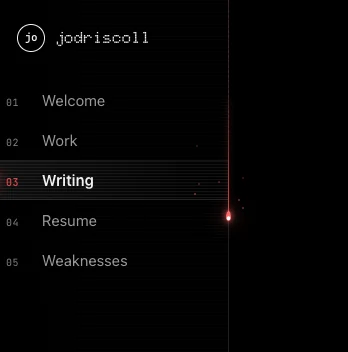
The sidebar on this site is 232 px wide, and its right edge is one pixel of border at x = 231. As of this post, that pixel is a fuse. Scroll and a small red drop burns its way down it, leaving a dashed, burnt trail. Near the end of the page it stops, swells and trembles. Then it falls, hits the line above Let’s Collaborate, and splashes.
It’s live on every page at desktop widths. Phones don’t show the sidebar, so they don’t get the fuse. With reduced motion turned on, the trail still tracks your progress, but there’s no drop, no sparks and no splash.
This post covers the brief, the two lines that decide where “the bottom” is, why the fuse can’t live inside the sidebar, why following the scroll isn’t the same as falling, how to make water look digital, and how I made sure it costs nothing when nothing’s moving. There are three demos to play with along the way.
The brief
I wrote it in one message to Claude, and asked it to take its time: a little red pulse, like a lit fuse, traveling down the sidebar’s right border as you scroll. When it reaches the bottom and touches the footer’s top border, it should spread out and fade along that border, like a drop of water hitting a puddle, “but more digital.”
That’s three behaviours in one sentence, and they pull against each other:
- A progress indicator has to follow the scroll exactly, in both directions.
- A falling drop has to accelerate and hit something. It can’t ease gently into place.
- A splash has to happen once, at a precise spot, and then get out of the way.
One read, start to finish
What the fuse does as you scroll a page. Not to scale.
below the top
throws embers
swells and trembles
2,600 px/s²
about 1.5 s
Where is “the bottom”?
The obvious bottom is the end of the page. It’s also wrong. The sidebar is fixed and the page scrolls past it, so there are two horizontal lines in play:
- The Let’s Collaborate border. It sits at the foot of the sidebar and never moves. At a 1440 × 900 window it’s at 833 px from the top.
- The footer’s top border. It scrolls up with the page, from far below the window toward the top.
At exactly one scroll position, the footer’s border passes through the Let’s Collaborate border, and for that moment they’re one line across the whole screen. That’s the puddle. On the post “From the chat app to the terminal”, that position is 4,238 px down a page that’s 5,665 px tall.
So progress isn’t scroll divided by page height. It’s scroll divided by the scroll at which the two lines meet:
const footTop = foot.getBoundingClientRect().top;
const meet = scrollY + footTop - floor; // floor: the Let's Collaborate border
const max = root.scrollHeight - innerHeight;
const range = Math.min(meet, max);
const p = range > 1 ? Math.min(1, Math.max(0, scrollY / range)) : 1;
Math.min(meet, max) covers pages too short for the lines to meet, where the fuse finishes at the end of the scroll instead. A page that can’t scroll at all gets no fuse.
Scroll the small page below. The readout shows both lines, and the drop lands when they match.
Scroll the page, light the fuse
A small copy of this site's layout, with the same rules as the real sidebar.
This demo needs JavaScript: a small page with a sidebar, where a red drop follows the scroll and splashes when the footer's border meets the sidebar's bottom border.
A sidebar that clips
The first version of the plan put the fuse inside the sidebar. It couldn’t work. The sidebar has overflow: hidden for its scanline texture, and overflow clips to the padding box. The border is outside the padding box, so anything drawn over it is cut off, glow and all.
So the fuse lives outside the sidebar, in two layers added to the page:
- A fixed, 1 px wide layer laid exactly over the border. It holds the trail, the hot glow behind the drop, and the drop itself, as plain elements moved with
transform. - A canvas over the whole window, with
pointer-events: none, for anything that leaves the line: embers, the splash and the crown.
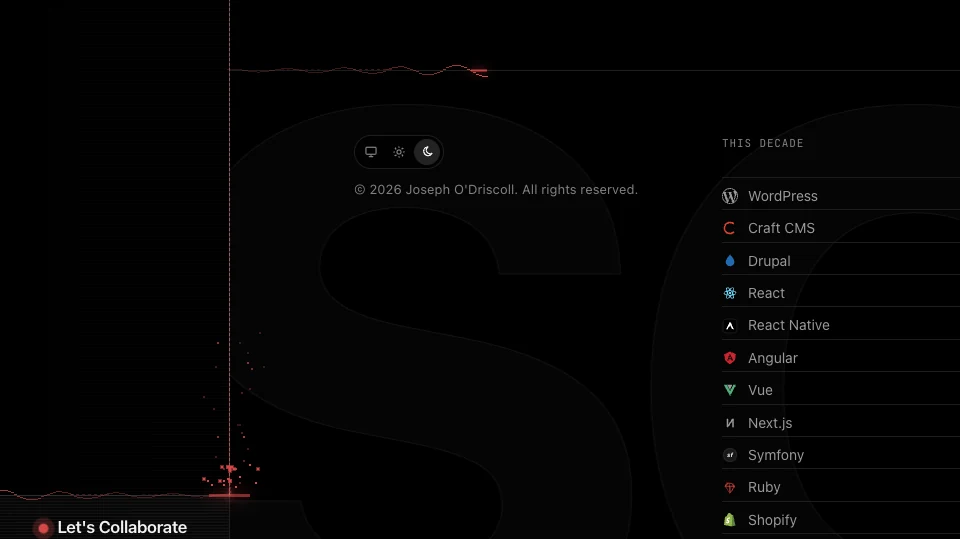
Precision is the whole effect. A splash one pixel off the border reads as a red line drawn near a gray one. The layer’s left edge is the sidebar’s right edge minus 1, which puts it on the border. On the canvas, the line’s center is the right edge minus half a pixel. The ripple is drawn on the row at the border’s own getBoundingClientRect().top, which is the border’s pixel. Left of the sidebar’s edge, that row is the Let’s Collaborate border. To the right, it’s the footer’s, read fresh on every frame because it moves:
const lineAt = (x: number, footTop: number) => (x < railX ? floor : footTop);That one function is why the last screenshot in this post works. If you keep scrolling while it splashes, the ripple stays on both lines as they come apart.
Following isn’t falling
To follow the scroll smoothly, the drop chases its target: each frame it closes a fixed share of the gap. That feels great while you read. It’s also the exact opposite of a fall. A chase is fastest at the start and slows to nothing as it arrives, so the drop would ease onto the line at almost zero speed. You can’t splash at zero.
Press the button, or wait for it to run once. Same distance, two motion models.
Follow versus fall
Both drops travel the same distance to the same line. The splash height comes from the speed at impact.
This demo needs JavaScript: two drops travel the same distance. The one that eases in arrives almost stopped and doesn't splash; the one under gravity arrives fast and splashes.
The fix is to use both models, and to switch between them on purpose. While you’re reading, the drop follows the scroll, but only to 90 px above the line. As the footer’s border comes within 160 px of the Let’s Collaborate border, the drop swells and trembles, a drip about to let go. When progress hits 1, following stops and gravity takes over for the last 90 px:
// Following: close part of the gap every frame.
y += (goal - y) * (1 - Math.exp(-dt * FOLLOW));

// Falling: once the lines meet, speed builds until the drop hits.
vel = Math.max(vel, 0) + GRAVITY * dt; // 2,600 px/s²
y += vel * dt;
if (y >= floor) impact(now);
The Math.exp(-dt * FOLLOW) form keeps the chase the same speed at 60 and 120 frames per second. Speed also stretches the drop, so it streaks as it falls and squashes back when it slows:
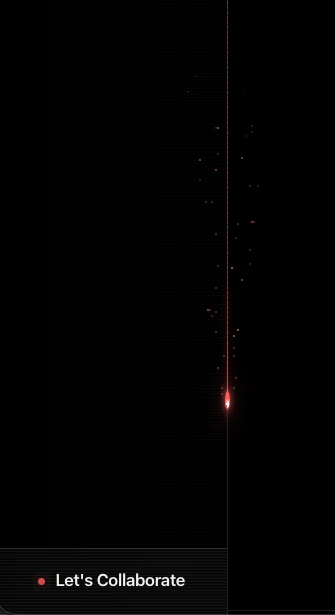
A bug I caught before it shipped. After landing, the drop goes back to following, and the follow target ends 90 px above the line. The burnt trail would have shrunk back up 90 px after every splash. The target now stays on the line once the drop has landed, and only lifts again when you scroll back below 97% progress and the fuse relights.
Making water digital
A real ripple is a smooth curve. “Digital” needed something else, and the answer was to quantize it. The line is drawn in 3 px cells, and each cell can only move up or down by a whole pixel:
for (let d = 0; d <= front; d += CELL) {
  const behind = front - d; // distance behind the leading edge
  const env = Math.exp(-behind / 160) * decay;
  const lift = Math.round(amp * env * Math.sin(d / 9 - u * 22));
  ctx.fillRect(x, lineAt(x, footTop) + lift, CELL, 1);
}
Math.round is the whole aesthetic. Without it the wave is soft and liquid. With it, the line steps like a waveform on an old scope. Around that sit four smaller pieces:
- A bright tip on each leading edge, with a little glow.
- Two fainter echo rings trailing behind, drawn as dashes.
- A flash and a short stepped column standing up off the impact for the first 16% of the splash.
- A crown of 24 pixels thrown up from the impact. Each one falls back under gravity, and wherever it lands it starts a small ripple of its own.
Try it. Switch the cell size to 1 px and the effect turns into water. At 6 px it turns into a bar chart.
The splash lab
The same splash code as the sidebar. Click anywhere on the panel to drop one.
This demo needs JavaScript: click to drop a drop onto a line and change how the ripple is drawn.
Touching the rest of the page
The Let’s Collaborate dot rings when the splash reaches it. The dot already pings every 2.4 s. On impact it gets one big ring, from a class the fuse adds to the button. The first version left the class on. Its rule is as specific as the button’s hover rule and loads later, so it won: after one splash, hovering the button no longer swapped the dot to its lit ping. The fuse now takes the class off 1.2 s later.
The red follows the theme. The canvas can’t read CSS variables while it paints, so the fuse reads --accent-red once at each splash. It also watches the theme attribute, so switching between light and dark doesn’t leave a splash in the old red.
The burnt trail stays. After the splash, the drop and its hot glow fade, and the trail stays at 70% opacity: a record that you got to the end.
Paying only while it moves
An effect that runs on every page has to cost nothing when nothing’s happening. The fuse has no animation loop of its own. Scroll and resize events ask for one frame, and a frame asks for the next only if there’s still work to do:
const kick = () => {
  if (raf) return;
  last = performance.now();
  raf = requestAnimationFrame(frame);
};
// …and at the end of each frame:
if (moving || swell > 0 || sparks.length || splashes.length) kick();
When you stop scrolling, the drop settles, the last ember fades, and the loop ends. A page you’re reading draws nothing.
The rest is about keeping each frame cheap:
- The fuse itself never triggers layout. The drop and the hot glow move with
transform. The trail is a fixed-height strip revealed withclip-path, not resized. - Each frame reads before it writes. A few
getBoundingClientRect()calls first, then the style changes, so the browser never has to lay out twice in a frame. - The canvas is capped at 2× pixel density. It covers the whole window, and a 3× canvas would be over twice the pixels for no visible gain on a 1 px line.
- The script loads only where it’s needed, as its own chunk, from the site’s single entry script.
Testing something you can’t watch
Claude tested it in the browser pane of the desktop app, and the first run said nothing moved at all. The drop sat at 0 px for the whole scroll. The pane stops requestAnimationFrame while it’s not on screen, and one frame had been requested before it stopped. That left a frame pending forever, and the if (raf) return guard turned every later request away.
In a real browser that’s correct: a background tab pauses and picks up where it left off. For the test, a two-line stand-in ran frames on a timer instead. Then the splash could be checked the only reliable way, by reading the canvas’s pixels on the border’s row as it played. The test scrolled to the meeting point and sampled at intervals. The right-hand ripple’s leading edge, across a 1440 px window:
How far the splash travels
Leading edge of the ripple, measured from the canvas pixels. Time is from reaching the meeting point, so the fall is included.
The splash starts between 150 and 250 ms after the lines meet, which is the 90 px fall. By 1,900 ms the canvas has no pixels left, so the loop has nothing to draw and stops.
The same test turned up one more bug. A page opened in a narrow window measured the sidebar at 0 px wide, since it’s hidden there. If the window then widened past 960 px, the fuse sat at the left edge of the screen. Each frame now checks the sidebar’s edge and measures again if it moved.
What it costs
- About 14 KB of source, 13,967 bytes of TypeScript and 3,736 of CSS, loaded on every page with the sidebar.
- A canvas over the whole window. It ignores the pointer and is empty almost all the time, but it’s there.
- Two lights on one border. The sidebar’s old white light that slides down the same edge every 13 seconds still runs. Whether both should stay is the next decision.
What I learned
Looking back, three lessons stand out.
Find the real event, not the obvious one. “The bottom of the page” would have splashed onto nothing. The moment two borders line up is what makes it look like a drop hitting a surface.
Pick the motion model for the moment. A chase is right for tracking and wrong for impact. Using both, with a hang in between, is what makes it feel physical.
Quantize on purpose. Rounding the wave to whole pixels in 3 px cells is a single Math.round, and it’s the difference between “water” and “digital water”.
What’s next?
Deciding whether the old white light on the border should go. And, maybe, a version for phones: there’s no sidebar there, but there is a top bar with a bottom border.
The sidebar’s right edge is still one pixel at x = 231. It just has somewhere to go now.