A redirect is not a DNS record
Open https://www.jodriscoll.com one afternoon and Cloudflare answered with error 522, connection timed out. The bare domain, jodriscoll.com, loaded fine. Both names were in the same Cloudflare zone, on the same account.
It’s fixed now. www sends a 301 to the bare domain and keeps the path and query string: www.jodriscoll.com/resume?ref=test lands on jodriscoll.com/resume/?ref=test. The www DNS record is exactly as it was.
This post covers why a DNS record can’t do the redirect on its own, the command-line attempt that failed, and the dashboard steps that worked, with screenshots.
Why a record can’t redirect
It feels like www should be one line in DNS. It never was.
A DNS record only answers “where is this name?” An A record gives an IP address. A CNAME says “this name is another name for that one”. Neither one sends a visitor anywhere. A redirect is an HTTP response, a 301 with a Location header, and something has to be running to send it.
For years, that something was an old server. My www record was an A record pointing at a host from an old web plan. That host answered www requests with a redirect, so www looked like a DNS feature. It was the server.
When the server stopped answering, so did www. The record is proxied (the orange cloud), so Cloudflare took the request and tried to reach the old host behind it. Nobody answered. That’s what 522 means: Cloudflare is fine, and the origin behind it timed out.

The command-line attempt
The bare domain is served by a Cloudflare Worker, attached as a custom domain in its wrangler.jsonc. Adding www there looked like the obvious move:
"routes": [
  { "pattern": "jodriscoll.com", "custom_domain": true },
  { "pattern": "www.jodriscoll.com", "custom_domain": true }
]
npx wrangler deploy attached the first and refused the second:
✘ [ERROR] Trigger configuration for "jodriscoll" was only partially updated:

    Custom domains:
      - A request to the Cloudflare API
  (/accounts/<account-id>/workers/scripts/jodriscoll/domains/records) failed.
        - Hostname 'www.jodriscoll.com' already has externally managed DNS records (A, CNAME, etc).
  Delete them first or try a different hostname. [code: 100117]
A Worker custom domain wants to own its DNS record. It creates the record itself, and it won’t share the name with one it didn’t make. The way through is to delete the www record first.
I didn’t. This zone also carries mail and other records I can’t afford to fumble, and deleting a record by hand to make room for a redirect felt like the wrong trade. I took www back out of the Worker’s routes and deployed the bare domain alone.
Wrangler can’t make the redirect either. It manages Workers, not a zone’s rules. Doing it from a terminal means creating an API token in the dashboard first and calling the API with it, which is more steps than the dashboard itself.
The fix: one Redirect Rule
A Redirect Rule runs at Cloudflare’s edge, before the request is sent to any origin. Because the www record is proxied, every www request passes through Cloudflare, and the rule can answer it with a 301 without the dead server ever being asked. No DNS change.
In the domain’s sidebar, it’s under Rules, then Overview, then Create rule and Redirect Rule. Cloudflare ships a template called Redirect from WWW to Root. It opens a form that’s already filled in:
- Request URL:
https://www.* - Target URL:
https://${1}, where${1}is whatever matched the* - Status code: 301, Permanent Redirect
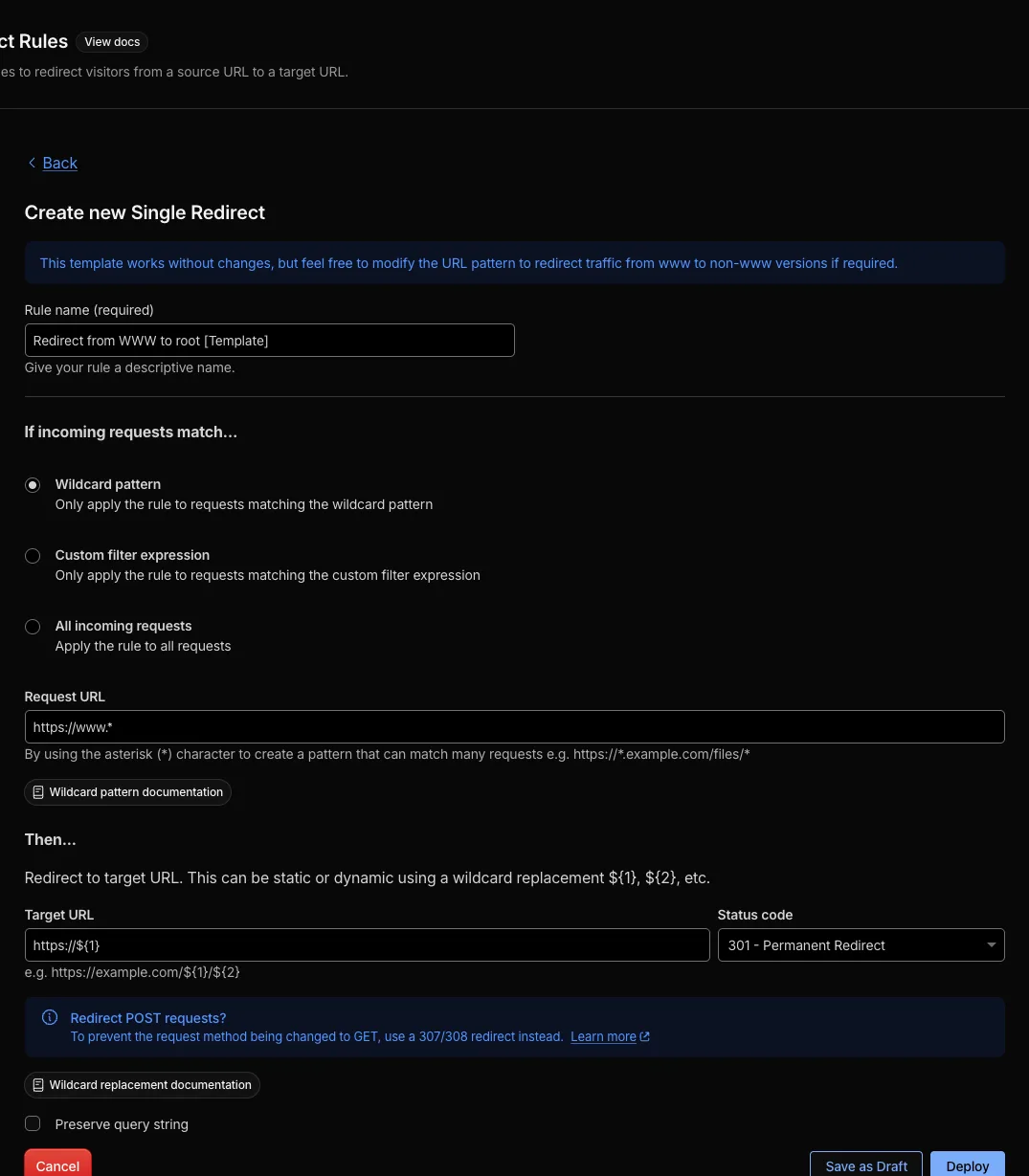
Tick Preserve query string. It’s off by default. Without it, ?utm_source=... and every other query string is dropped on the way to the bare domain.
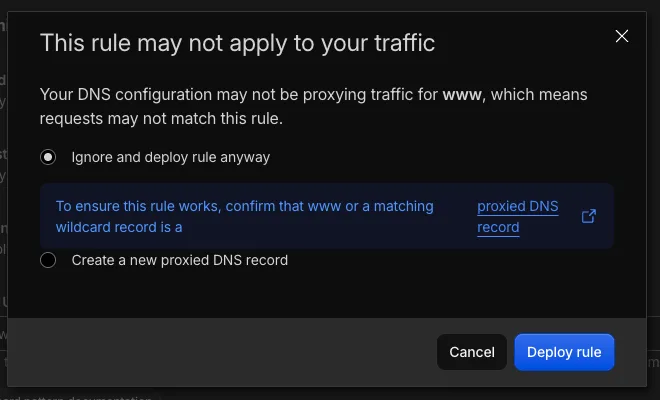
Then a warning you can ignore. Deploying opens a dialog saying the DNS configuration “may not be proxying traffic for www”. Mine was proxied. The dialog offers to create a new proxied DNS record instead, which is the one choice here that would have touched DNS. Keep Ignore and deploy rule anyway and deploy.
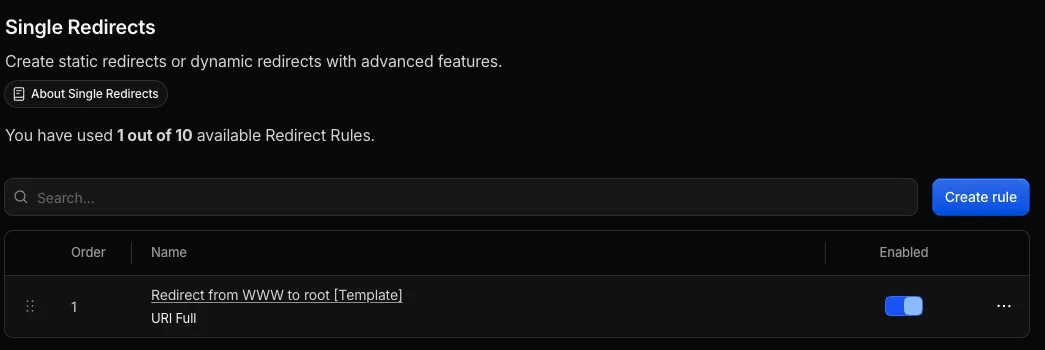
The rule shows up enabled, first in order:
Results
- Before:
https://www.jodriscoll.comreturned Cloudflare error 522. - After:
https://www.jodriscoll.com/resume?ref=testredirects tohttps://jodriscoll.com/resume/?ref=test, path and query intact. - Unchanged: the
wwwDNS record, and every other record in the zone.
To check it from a terminal, curl -sI https://www.jodriscoll.com/ prints the status line and the Location header without following the redirect.
What it costs
The free plan allows 10 Redirect Rules on a zone. This uses 1.
The template only matches https://www.*. A plain http://www. request only reaches the rule if Cloudflare upgrades it to HTTPS first.
What I learned
Looking back, three lessons stand out.
A redirect needs something running. DNS points; HTTP redirects. If www “just worked” for years, some server was doing the work.
Proxied records let the edge answer. The orange cloud is what made a no-DNS-change fix possible. With a grey-cloud record, the rule would never see the request.
Read the warning, then read the record. The dialog’s suggestion was the one option that changed DNS. The record list already showed it wasn’t needed.
What’s next?
Confirm that Always Use HTTPS is on for the zone, so http://www. reaches the rule too. Then decide what to do with the other records that still point at the old host.
The bare domain was never the problem. www had been leaning on a server I’d forgotten was there.